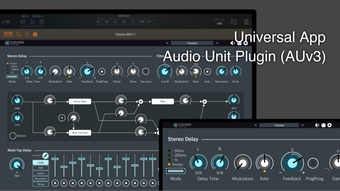

Yukawa: Dynamic AUv3 Audio Effects for iOS & Mac
Overview
Yukawa is an AUv3-compatible audio effect plug-in developed by iceWorks Inc., designed for music producers and audio creators seeking creative flexibility within their digital audio workstations. Built specifically for Apple’s ecosystem, Yukawa delivers a suite of real-time audio processing tools tailored for both mobile and desktop environments. Its core purpose lies in enhancing musical compositions through rhythmic and spatial sound design, making it particularly useful for electronic music, sound design, and live performance scenarios.
The plug-in enables users to craft intricate rhythmic phrases using its tempo-synchronized multi-tap delay, while the modifiable stereo delay contributes depth and dimension to audio signals. Additionally, the DJ mixer-style filter provides precise control over tonal balance, allowing for expressive manipulation of frequency content. Target users include independent artists, producers working on iPhone or iPad, and Mac-based creators utilizing Apple Silicon hardware.
The software is available as a full version with no limitations, and it is free to download and use. The developer did not provide additional details about its intended use beyond music production and audio enhancement.
Key Features & Capabilities
- Tempo-Synchronized Multi-Tap Delay: Enables the creation of rhythmic patterns that align with the project’s tempo, allowing users to generate complex, evolving loops and percussive textures in real time.
- Modifiable Stereo Delay: Offers independent control over left and right channels, facilitating the creation of wide, immersive soundscapes ideal for ambient and cinematic music.
- DJ Mixer-Style Filter: Provides a tactile, mixer-like interface for shaping the frequency spectrum, enabling dynamic filtering that responds to performance dynamics and creative intent.
- Full AUv3 Compatibility: Integrates seamlessly into supported DAWs on iOS and Apple Silicon Mac devices, ensuring consistent performance across compatible platforms.
- Mobile-First Design: Optimized for touch input on iPhone and iPad, offering intuitive gesture-based controls and responsive feedback for on-the-go production.
These features empower users to experiment with sound in real time, whether designing layered textures for a track or enhancing live performances. The multi-tap delay can be used to generate echo patterns that follow a song’s rhythm, while the stereo delay adds spatial depth without overwhelming the mix. The filter allows for real-time tonal shaping, useful during transitions or to emphasize specific elements in a composition. All functions are accessible within a single interface, minimizing workflow interruptions and supporting efficient creative iteration.
User Interface, Workflow & Performance
The user interface of Yukawa is designed with clarity and functionality in mind, featuring a clean layout that prioritizes accessibility on touch-based devices. Navigation is straightforward, with clearly labeled controls and visual feedback for parameter adjustments. The interface adapts to different screen sizes, ensuring usability on both iPhone and iPad.
On Apple Silicon Macs, the plug-in maintains a responsive feel, though exact performance metrics were not specified by the developer. The workflow is optimized for real-time manipulation, allowing users to adjust delay timing, filter cutoff, and stereo width without noticeable latency. The developer did not specify resource usage details, but general software behavior suggests efficient CPU and RAM utilization typical of lightweight AUv3 plug-ins.
Stability is expected to be consistent given its compatibility with Apple’s native audio framework. No reports of crashes or freezes were mentioned in the provided materials.
Compatibility & System Requirements
Yukawa is compatible with iPhone, iPad, and Apple Silicon Mac devices. It does not support Macs with Intel CPUs, which limits its reach within the broader Mac user base. The software is available as a full version with a file size of 12.5 MB, indicating a lightweight installation.
The developer did not provide additional system requirements beyond platform compatibility. Exact performance details were not specified, and no information was shared about required audio interfaces or DAW versions. Platform compatibility information is limited to the devices listed, with no mention of third-party integration beyond AUv3.
Users should ensure their device meets Apple’s standard requirements for running AUv3 plug-ins, which typically include a recent version of iOS or iPadOS and macOS.
Pros and Cons
Pros
- Free to download and use, with no feature restrictions
- Full AUv3 compatibility for seamless integration with supported DAWs
- Optimized for touch-based input on iPhone and iPad
- Supports Apple Silicon Macs, ensuring native performance
- Offers a unique combination of rhythmic delay, stereo effects, and filter control
Cons
- Not compatible with Intel-based Macs
- No information on system requirements beyond supported platforms
- May produce loud output depending on parameter settings
- Limited to Apple’s ecosystem, excluding Windows and other platforms
- Developer did not provide detailed documentation or tutorials
FAQ Section
Is Yukawa compatible with my Mac?
Yukawa is compatible only with Apple Silicon Mac devices. It does not support Macs with Intel processors.
Can I use Yukawa on my iPhone or iPad?
Yes, Yukawa is designed for iPhone and iPad and is fully functional on these devices when used with compatible DAWs.
Is Yukawa a free software?
Yes, Yukawa is available at no cost. It is a full version with no limitations or trial restrictions.
Does Yukawa require an internet connection?
No, Yukawa operates entirely offline. It does not require an internet connection for core functionality.
How often are updates released?
The developer did not specify an update schedule. However, the initial release was on March 15, 2024.
Final Thoughts & CTA
Yukawa stands out as a versatile and accessible AUv3 plug-in for creators within Apple’s ecosystem. Its combination of tempo-synced multi-tap delay, stereo delay, and DJ-style filtering offers powerful tools for shaping sound in real time. The fact that it is free and fully functional makes it an excellent choice for producers exploring new sonic textures.
While its limited compatibility with Intel-based Macs and lack of documentation may pose challenges for some users, its performance on Apple Silicon devices and intuitive interface on mobile platforms provide a strong user experience. For musicians, sound designers, and producers working on iPhone, iPad, or Apple Silicon Macs, Yukawa delivers a compelling set of tools without cost. It is particularly well-suited for those who value creative flexibility and real-time control in their workflow.
Download Yukawa now and elevate your music production with dynamic, rhythm-driven effects.







